Code integration
For website developers — the one-line script for anonymous embed, the entry ticket and member data for member embed, the widget's language, and automatic translation of help articles
This page is for the developer responsible for the website: where to put the embed code and code snippets copied from the admin, and how to adapt them. The website's URL must first be registered in Host sites; on a website that is not registered, the embed code does not work.
Two ways to embed; the difference is whether a backend is needed
- Anonymous embed — just add one
<script>line to the page; static pages work too - Member embed — after a member signs in, the website backend signs an "entry ticket" and puts it in that
<script>line. Suits websites that already have member sign-in and member data
In the examples below, https://your-domain.example.com stands for the URL of the SupaTalker admin, and the Host ID and secret are placeholders; always use the values copied from the admin.
Anonymous embed
After registering the URL in the "Anonymous embed" section of the admin, click "Copy embed code" and paste this line into every page where the chat widget should appear, before </body>:
<!doctype html>
<html lang="en">
  <body>
    <!-- The website's existing content -->

    <script src="https://your-domain.example.com/embed.js"></script>
  </body>
</html>
A bubble button then appears at the bottom right of the page, and visitors click it to open the chat widget. Here is how it looks embedded on the SupaTalker website:
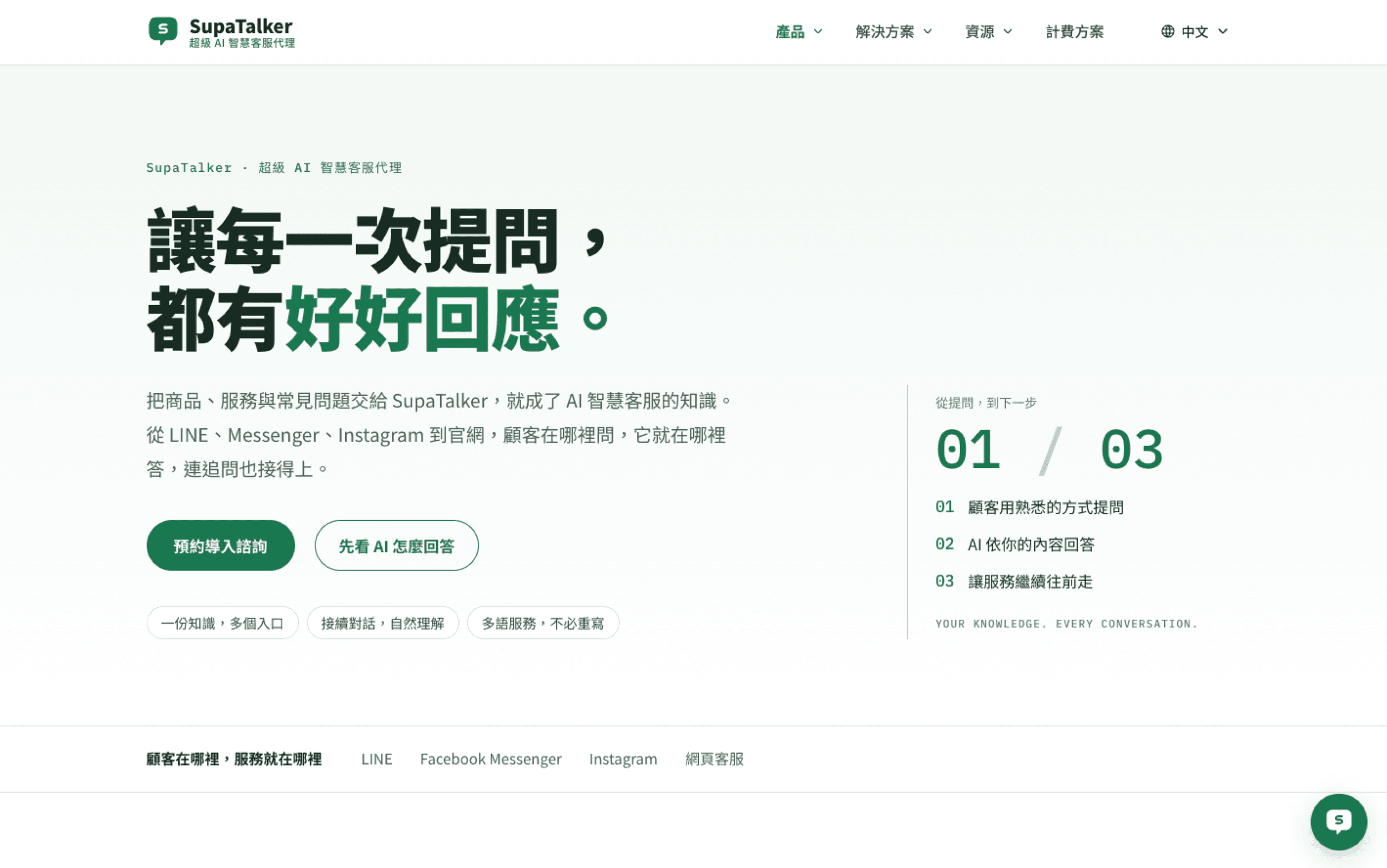
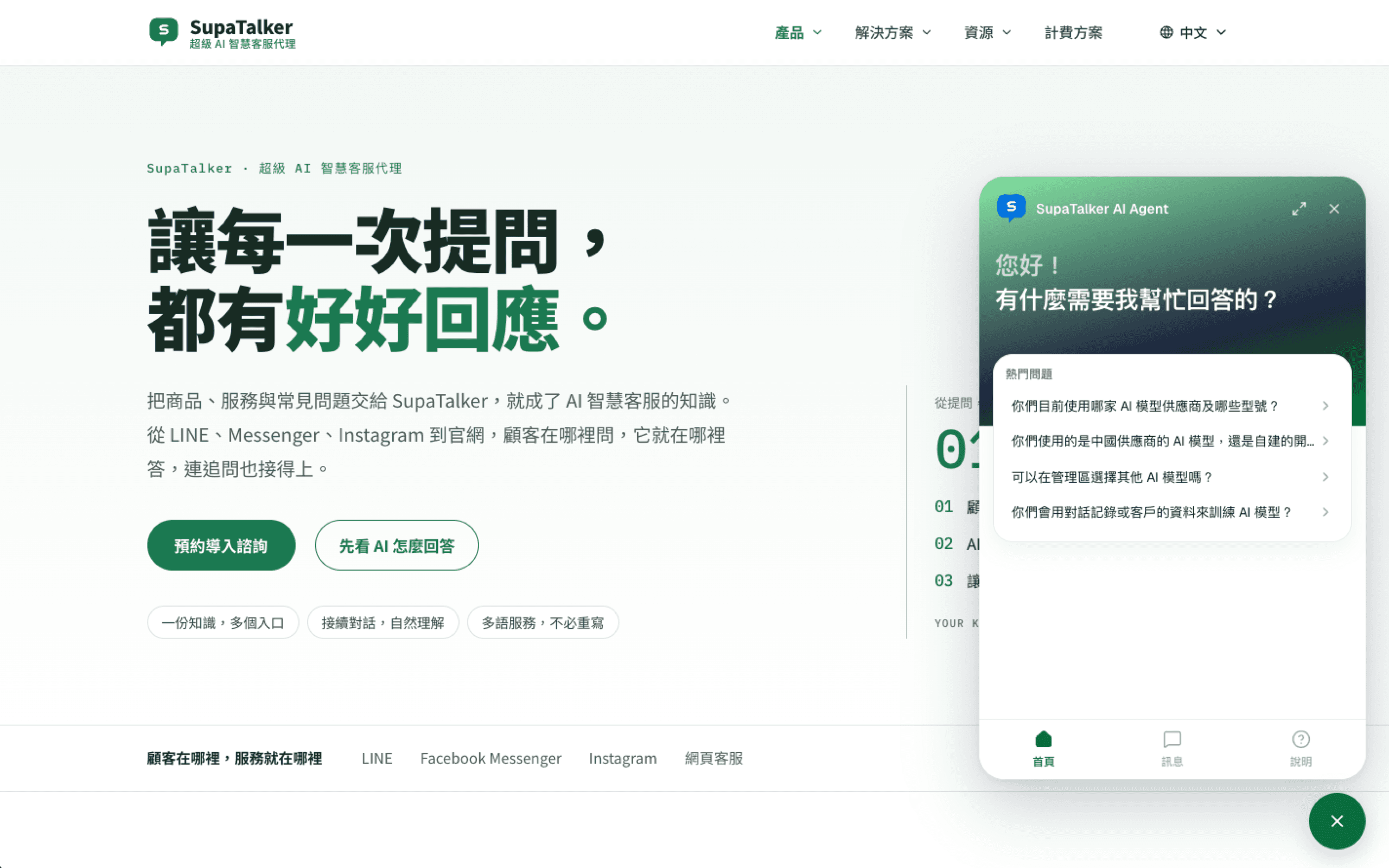
The bubble's color, shape, position and name are set centrally in the admin's Settings; you do not add any attributes to this line. Changes in the admin take effect in about a minute, with no need to paste the code again.
Member embed
Suits websites that already have member sign-in and are built with a backend language such as Node, PHP or Python. How it works:
- After a member signs in to the website, the website backend signs an entry ticket with the Host ID and secret
- The entry ticket goes into the
data-member-tokenattribute of the<script>, output on the page - The chat widget uses the ticket to confirm the member's identity, so the visitor chats as a member and the conversation history is kept with the member
After creating the site in the "Member embed" section of the admin, that site's "Copy Node snippet", "Copy PHP snippet" and "Copy Python snippet" copy code snippets with the Host ID and secret already filled in, as follows:
const crypto = require('node:crypto')
const appOrigin = "https://your-domain.example.com"
const hostId = "embed_xxxxxxxx-xxxx-xxxx-xxxx-xxxxxxxxxxxx"
const secret = "<secret>"
const base64url = (value) => Buffer.from(value).toString('base64url')
const now = Math.floor(Date.now() / 1000)
const payload = { v: 1, iss: hostId, sub: currentUser.id, jti: crypto.randomUUID(), name: currentUser.name, email: currentUser.email, iat: now, exp: now + 120 }
const signingInput = base64url(JSON.stringify({ alg: 'HS256', typ: 'JWT' })) + '.' + base64url(JSON.stringify(payload))
const token = signingInput + '.' + crypto.createHmac('sha256', secret).update(signingInput).digest('base64url')
res.setHeader('Cache-Control', 'private, no-store')
res.write('<script src="' + appOrigin + '/embed.js" data-member-token="' + token + '"><\/script>')<?php
$appOrigin = "https://your-domain.example.com";
$hostId = "embed_xxxxxxxx-xxxx-xxxx-xxxx-xxxxxxxxxxxx";
$secret = "<secret>";
$base64url = fn($value) => rtrim(strtr(base64_encode($value), '+/', '-_'), '=');
$now = time();
$payload = ['v' => 1, 'iss' => $hostId, 'sub' => $currentUser['id'], 'jti' => bin2hex(random_bytes(16)), 'name' => $currentUser['name'], 'email' => $currentUser['email'], 'iat' => $now, 'exp' => $now + 120];
$signingInput = $base64url(json_encode(['alg' => 'HS256', 'typ' => 'JWT'])) . '.' . $base64url(json_encode($payload));
$token = $signingInput . '.' . $base64url(hash_hmac('sha256', $signingInput, $secret, true));
header('Cache-Control: private, no-store');
echo '<script src="' . htmlspecialchars($appOrigin, ENT_QUOTES) . '/embed.js" data-member-token="' . htmlspecialchars($token, ENT_QUOTES) . '"><\/script>';import base64, hashlib, hmac, json, time, uuid
app_origin = "https://your-domain.example.com"
host_id = "embed_xxxxxxxx-xxxx-xxxx-xxxx-xxxxxxxxxxxx"
secret = "<secret>"
def base64url(value): return base64.urlsafe_b64encode(value).rstrip(b'=').decode()
now = int(time.time())
payload = {'v': 1, 'iss': host_id, 'sub': current_user.id, 'jti': str(uuid.uuid4()), 'name': current_user.name, 'email': current_user.email, 'iat': now, 'exp': now + 120}
signing_input = base64url(json.dumps({'alg': 'HS256', 'typ': 'JWT'}, separators=(',', ':')).encode()) + '.' + base64url(json.dumps(payload, separators=(',', ':')).encode())
signature = base64url(hmac.new(secret.encode(), signing_input.encode(), hashlib.sha256).digest())
token = signing_input + '.' + signature
response.headers['Cache-Control'] = 'private, no-store'
response.write('<script src="' + app_origin + '/embed.js" data-member-token="' + token + '"><\/script>')A few variables in the snippet need to be replaced with your website's own:
| Name in the snippet | Replace with |
|---|---|
currentUser (current_user in Python, $currentUser in PHP) | The member currently signed in; see the next section |
res / response | Your web framework's response object |
res.write(...) / echo / response.write(...) | Change it to output this <script> before </body> on the page, for example in the page template |
The secret must only be on the website backend
The secret is this site's key, so it must never appear anywhere the browser can see (front-end JavaScript, HTML source), and should not be committed to version control. Read it from an environment variable instead. If the secret leaks, click "Rotate secret" in the admin to get a new one, then update the website.
Passing member data
Member data goes in the entry ticket's content (the payload in the snippets above):
| Field | Required | Description |
|---|---|---|
v | ✓ | Always 1 |
iss | ✓ | The Host ID shown in the admin |
sub | ✓ | The member's permanent ID on your website. Starts with a letter or digit, uses only letters, digits and . _ : -, up to 128 characters |
jti | ✓ | A random value that differs for every ticket; the snippet already generates it |
iat, exp | ✓ | Issued-at and expiry times (Unix seconds). The expiry can be at most 120 seconds after issuing |
name | Optional | The member's name, up to 120 characters |
email | Optional | The member's email, up to 254 characters |
subdecides "is this the same member": the samesubis treated as the same member, and the conversation history all goes under the same visitor. Use the member number from your database, not the email (an email contains@, which does not fit the format, and members may change their email)nameandemailare written only once: they are filled into the admin's visitor data only while those two fields are still empty; later changes on your website do not overwrite values already in the admin- Sign again on every page load: a ticket can only be used once and expires within 120 seconds. So this
<script>must be signed fresh every time the page is generated and must not be cached; theCache-Control: private, no-storein the snippet is there for this
For example, in Node.js (Express), turn the snippet into a function and output it on pages after the member signs in:
const crypto = require('node:crypto')

const appOrigin = 'https://your-domain.example.com'
const hostId = process.env.SUPATALKER_HOST_ID
const secret = process.env.SUPATALKER_EMBED_SECRET
const base64url = (value) => Buffer.from(value).toString('base64url')

function memberChatScript(member) {
  const now = Math.floor(Date.now() / 1000)
  const payload = {
    v: 1,
    iss: hostId,
    sub: String(member.id),
    jti: crypto.randomUUID(),
    name: member.name,
    email: member.email,
    iat: now,
    exp: now + 120,
  }
  const signingInput =
    base64url(JSON.stringify({ alg: 'HS256', typ: 'JWT' })) +
    '.' +
    base64url(JSON.stringify(payload))
  const token =
    signingInput + '.' + crypto.createHmac('sha256', secret).update(signingInput).digest('base64url')
  return `<script src="${appOrigin}/embed.js" data-member-token="${token}"></script>`
}

app.get('/account', requireLogin, (req, res) => {
  res.setHeader('Cache-Control', 'private, no-store')
  // req.user is the member data provided by your website's own sign-in
  res.render('account', { chatScript: memberChatScript(req.user) })
})
The page template outputs chatScript before </body> (using your template syntax, without letting it be escaped as text).
Pages where the member is not signed in
URLs registered in the member section can also embed the anonymous chat directly, without registering them again. So while the member is not signed in yet, output the anonymous embed line; after they sign in, output the version with data-member-token instead.
The widget's language
The chat widget's interface and AI replies support three languages: Traditional Chinese, English and Japanese. The language is decided in this order:
- The
data-localeattribute of the<script> - The value of the page's
<html lang> - The "Chat widget default language" of that host site in the admin
- The site default language in Settings
For the first two, zh-TW, zh-Hant and zh-HK count as Traditional Chinese, values like en and en-US as English, and ja as Japanese; any other language (including Simplified Chinese) falls through to the next item.
If your website is multilingual, you usually do not need to set anything; the widget follows <html lang>, and when a single-page app switches language by changing only <html lang>, the widget switches too. To fix a language, add data-locale to the <script>:
<script src="https://your-domain.example.com/embed.js" data-locale="ja"></script>With data-locale set, the widget no longer follows changes to <html lang>.
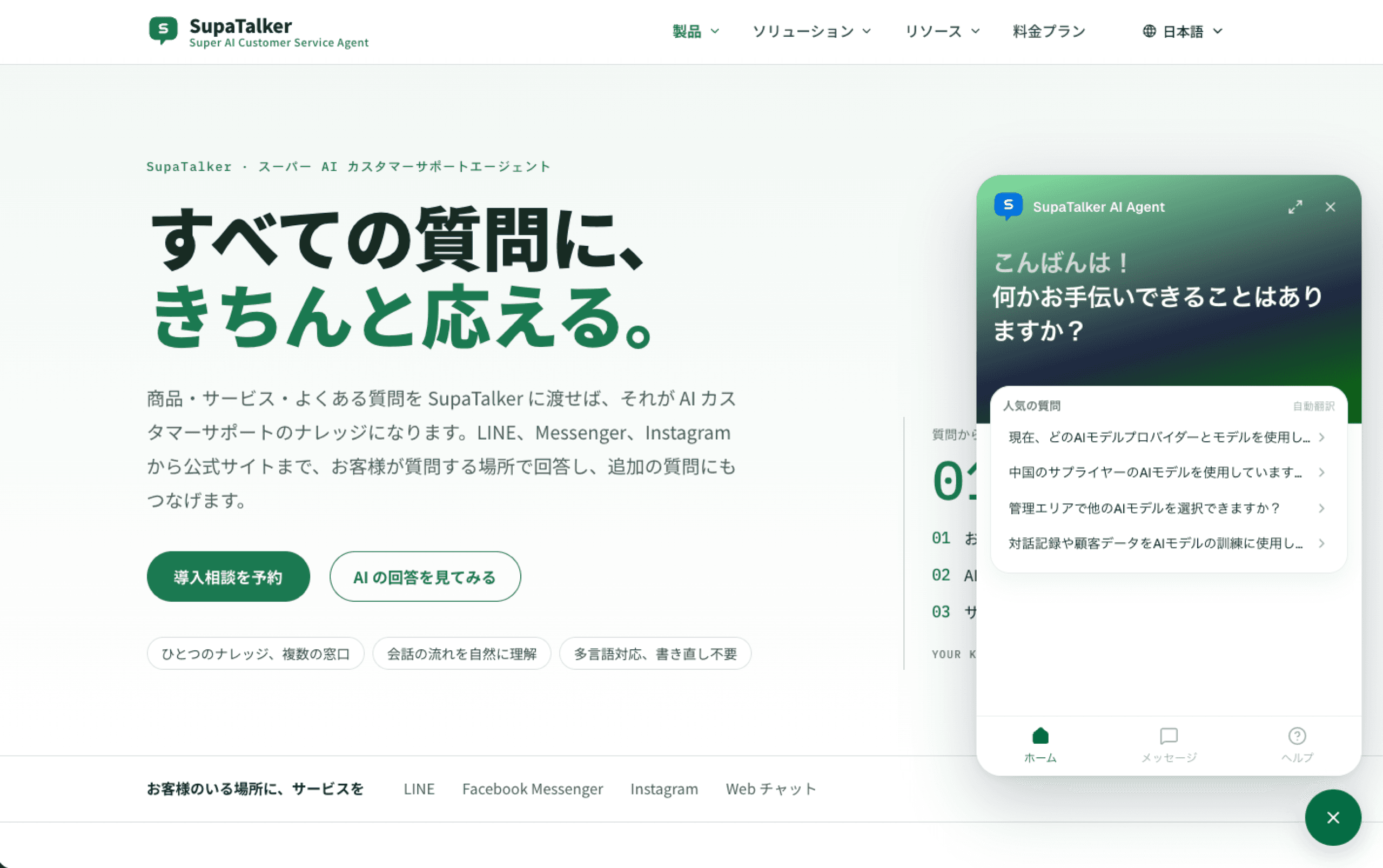
The screenshot below is the widget opened after the SupaTalker website was switched to Japanese: the interface changes to Japanese, the popular questions show Japanese translations, and "自動翻訳" (auto-translated) is shown at the top right (see the next section).
Other: automatic translation of help articles
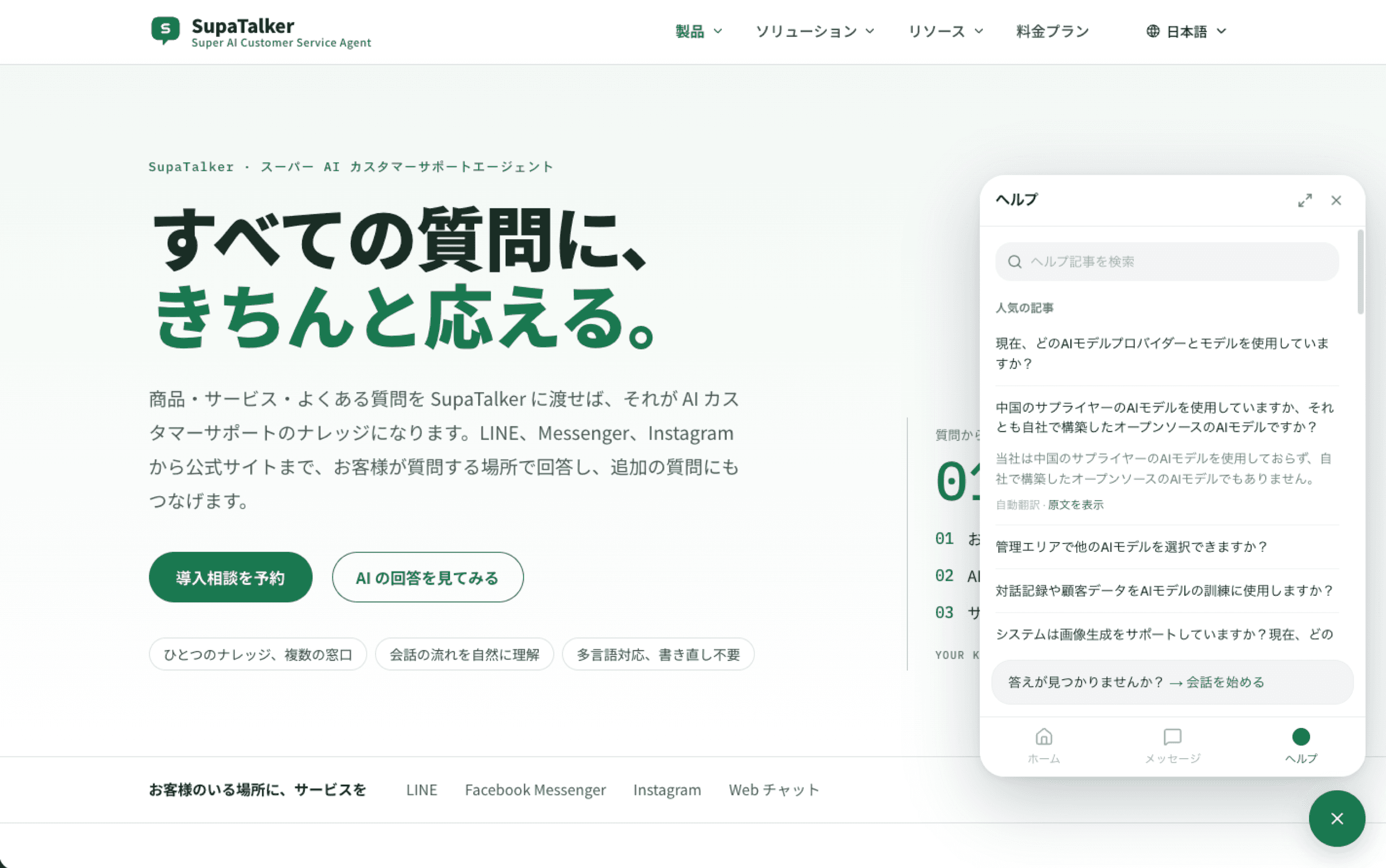
The articles in the widget's "Help" tab and in "Popular questions" on Home come from the knowledge base categories checked in Settings. You only need to write these articles in one language; the system automatically translates them into the widget's other two supported languages.
- The original language is the site default language, and it is translated automatically into the other two
- When the widget is shown in another language, article titles and answers use the translation; popular questions on Home are labeled "Auto-translated", and below an expanded answer in the Help tab it says "Auto-translated · Show original", where visitors can click "Show original" to switch back (in the Japanese interface above it is "自動翻訳 · 原文を表示")
- Translation runs once an hour (at half past), only for articles that are new or changed, so new or just-edited articles show the original until the next translation is done
- Articles that fail to translate keep showing the original, and an event is recorded in Security
Only published knowledge base articles in the checked categories are translated. The AI's replies in conversations are not affected by this; the AI already answers in the widget's current language.